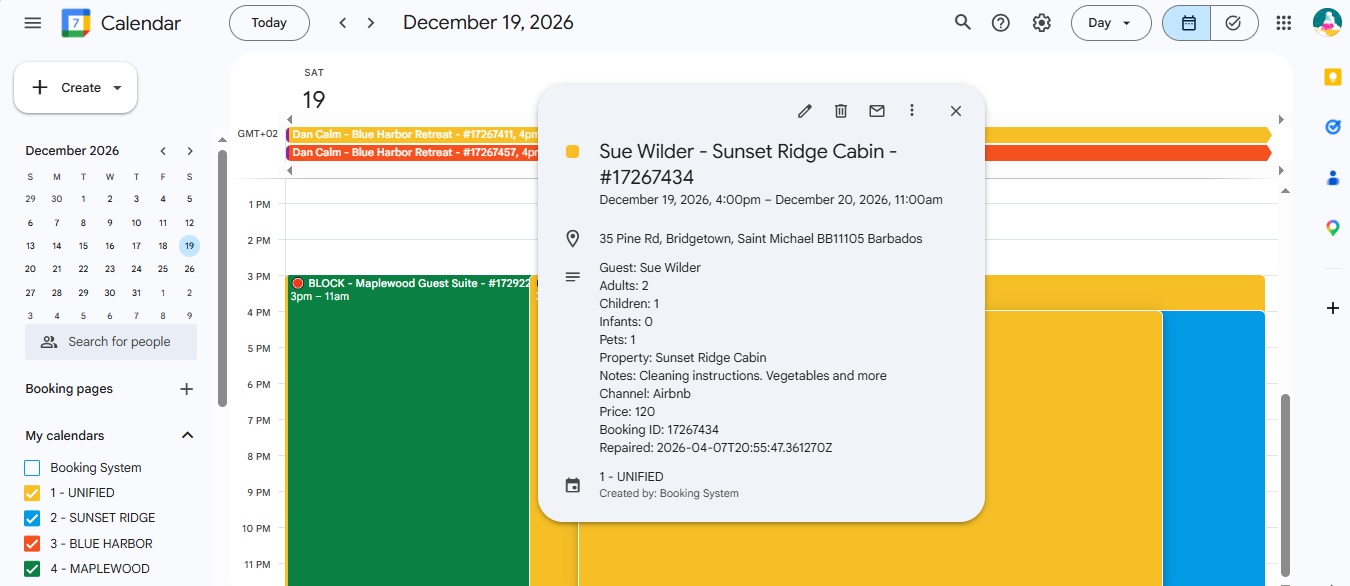
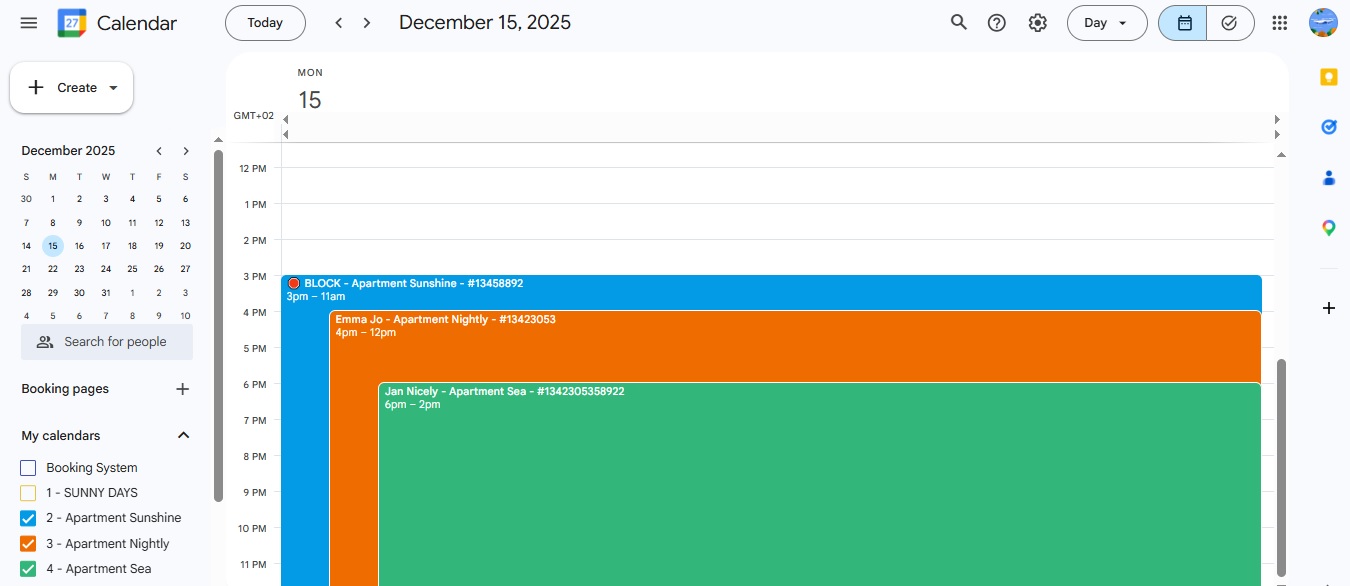
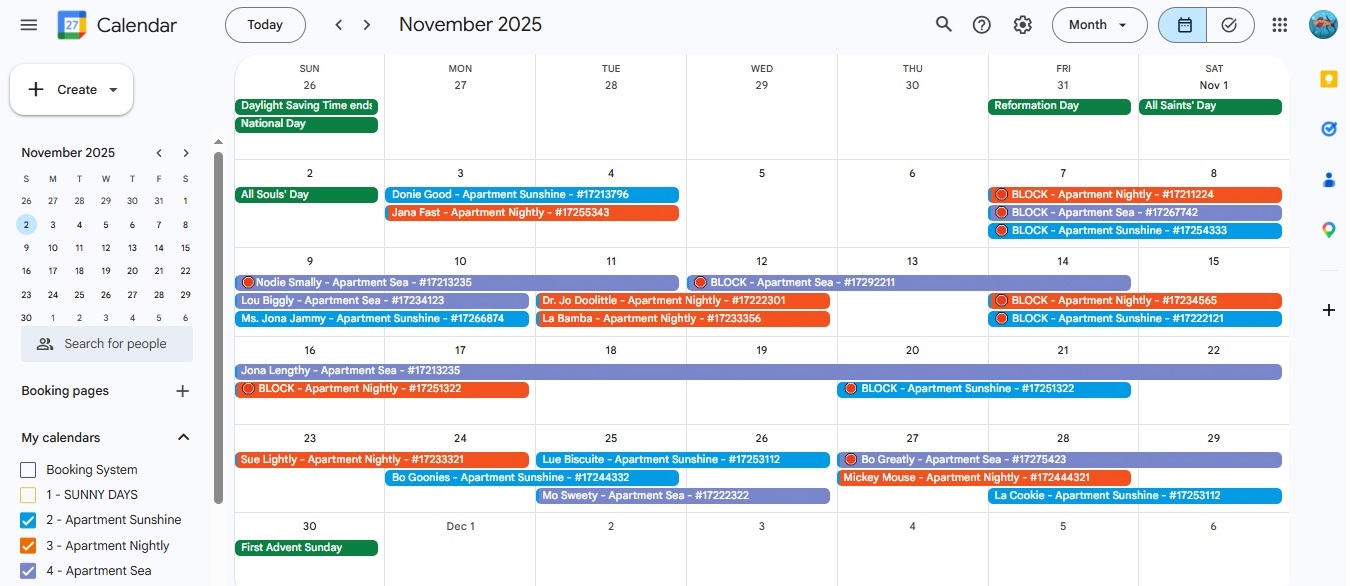
All your bookings in your Google Calendar (unified and per‑property) — updated in real time.
Managing bookings across Booking.com, Airbnb, and your
property software (PMS / channel manager) can quickly become overwhelming —
especially when switching between different calendars or checking availability on the go.
Booklogica Calendar Sync brings all your reservations into the
Google Calendar you already use every day.
Fast, familiar, and always up‑to‑date.
Unlike traditional iCal feeds that refresh slowly, our sync updates your Google Calendar
in real time, giving you a clear overview of
reservations, blocked dates, availability, and guest details — on any device.
Your data stays GDPR‑aware and secure.
We use your Google Calendar access only to display and sync your bookings.
Your data is never shared, sold, or used for marketing or any other commercial purpose. Booklogica is privacy‑first: no tracking cookies, no analytics, and no access beyond your calendar.
✔ Officially verified by Google OAuth
✔ Calendar‑only access (no Gmail, Drive, Contacts)
✨ New: Booklogica is now an official OwnerRez integration
We’re excited to announce that Booklogica Calendar Sync is now officially integrated with
OwnerRez, one of the leading platforms in the vacation rental industry.
This brings faster setup, smoother Google Calendar syncing for your bookings, and a fully
verified connection for all OwnerRez users.
About OwnerRez:
Experience the difference of “Elite.” OwnerRez is internationally recognized as a leader in the
vacation rental industry for channel management, CRM, PM, accounting, messaging, and websites.
Integrate with all major vacation rental channels to seamlessly sync availability, rates, rules,
and listing content. Get your own modern fast website, process payments directly, manage inquiries,
communication, and guest checkout with e‑sign renter agreements.
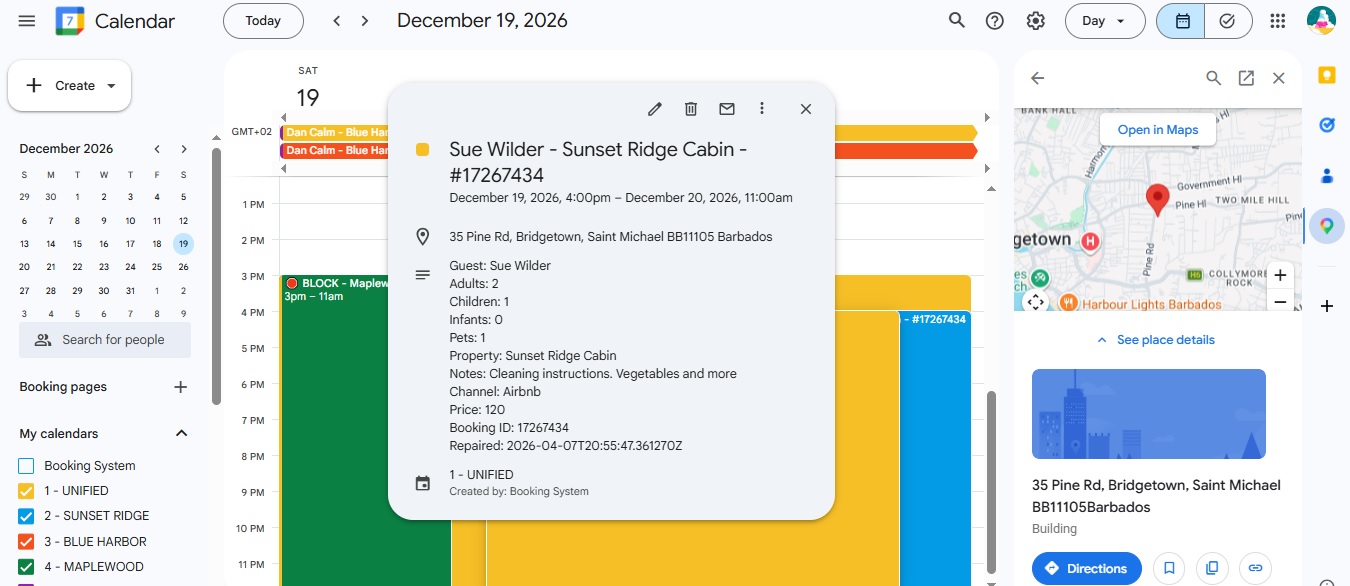
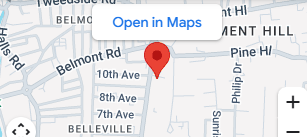
✨ New: Every Booking in Your Google Calendar Now Includes the Full Property Address
Tap the location to open Google Maps — perfect for cleaners, co‑hosts, and external staff.
We now automatically sync the full property address from OwnerRez
Every event in your Google Calendar includes the correct location
One tap opens Google Maps for navigation
No more guessing which property a booking belongs to
‹
›
Why not just use Google Calendar for free?
Google Calendar is free — but syncing it reliably with your PMS or channel manager is not. Traditional iCal feeds refresh slowly, break easily, and cannot repair missing events.
iCal feeds update every 30–60 minutes
They are one‑way only (no repair, no consistency)
Events can disappear or drift over time
No unified calendar or multi‑calendar support
What hosts actually want
Real‑time updates
Unified and per‑property calendars
Automatic repair of missing events
Property names instead of IDs
No duplicates or drift
No broken iCal feeds
A clean, mobile‑friendly overview
Booklogica delivers all of this — instantly, reliably, and without any manual fixes.
Connect Your Google Calendar
It gives you a clean, real‑time overview of your bookings — on any device, anywhere.
Many PMS or channel manager calendars are not optimized for mobile, can feel cluttered, or require multiple clicks to see availability. With Booklogica Calendar Sync, your bookings (from Booking.com, Airbnb and others) appear instantly in the calendar you already use every day — fast, familiar, and always up‑to‑date.
It’s the easiest way to keep track of your reservations without switching apps or learning new tools.
How It Works
Booklogica connects your PMS or channel manager to Google Calendar and keeps everything in sync automatically. Your PMS stays the source of truth, while Google Calendar becomes your clean, real‑time overview of all bookings.
Reliable, and privacy‑first architecture. Your PMS/channel manager remain the single source of truth, while Google Calendar becomes a real‑time window into your booking activity.
Works with selected PMS and channel managers. Contact us to check if yours is supported.
OwnerRez users: You can start your Booklogica signup directly here.
The onboarding flow is fast and intuitive: users authenticate Google Calendar, confirm their calendars, and complete a token‑secured mapping interface where all properties are automatically pre‑loaded. Setup takes 2-3 minutes and requires no technical knowledge.
Whether you’re a small host or a multi‑property operator, you get instant, accurate booking visibility across unified and per‑property calendars — without any engineering or hosting effort on your side.
Why must I connect my Calendar
This application requires permission to create, update, and delete events in your Google Calendar so that your booking information stays synchronized in real time.
We do not store personal identifiers such as guest names, emails, or notes. We only store non‑identifying booking metadata (dates, guest count, booking ID, property ID).
All data is stored securely in EU‑based Google Cloud infrastructure. You can revoke access at any time in your Google Account settings.
Optional: per‑client booking reports in Looker Studio (never aggregated across users)
Frequently Asked Questions
What does Booklogica Calendar Sync cost?
Booklogica Calendar Sync is available at $4.95 / €4.95 per month (exclusive applicable local taxes) for small hosts (no setup fee and no long‑term commitment). A 30-day free trial is included — no payment is required to get started. This is an Early Access price.
All subscriptions are processed securely by one of our designated and industry-leading third-party Merchant of Record partners. All transactions, billing, and refunds are subject to the specific terms of sale and policies of the respective Merchant of Record. We offer an unconditional 14-day money-back guarantee on your initial sign-up purchase; you may cancel your subscription and request a full refund within 14 days of this initial transaction. Outside of this initial 14-day window, you may still cancel your subscription at any time. Upon cancellation, your access will continue until the end of your current paid billing cycle. Subsequent automatic monthly renewals are non-refundable, and we do not issue prorated refunds for past or partial months.
The subscription includes real‑time Google Calendar sync, unified and per-property‑calendars, Soft Mode daily API repair of your calendars (only deleted reservations get restored automatically, protecting you from accidental data loss, typically within 24 hours — all your other manual changes stay preserved) and personal email support.
Strict Mode for daily repair — where your Google Calendar becomes an exact mirror of your (e.g. OwnerRez) account and any manual notes may be overwritten — is available as an optional upgrade.
We generally recommend Soft Mode for most hosts, as it provides more flexibility and preserves any manual notes or adjustments you make in Google Calendar.
After the initial free trial and full sync, billing begins. You are charged for your first month, and then monthly on the same day. You can cancel at any time — future payments stop immediately. Access continues until the end of your billing cycle. To cancel, use the “Manage your subscription” link found inside the official receipt email sent to you immediately after your initial purchase. Additionally, we would appreciate if you send us an email at team@booklogica.com using the same email you used during onboarding with feedback. That’s all — simple.
Do I need to use my personal Gmail / Google Account for this to work?
You can use any Google Account you prefer. For privacy reasons, we actually recommend creating a separate Google Account dedicated to your bookings — it’s free, takes less than 5 minutes, and keeps your personal Gmail completely separate. Many hosts choose this option for peace of mind, but using your existing account works just as well.
Regardless of which account you choose, we only receive Calendar access for that specific Google Account through the official Google OAuth process. No other data (Gmail, Drive, Contacts, etc.) is accessible.
Our entire sync engine runs exclusively on Google Cloud infrastructure, and we have a signed Data Processing Agreement (DPA) with Google. The only other service involved is Cloudflare, which we use for security and protection. We do not use Google Analytics or tracking cookies on this landing page. We only utilize Cloudflare’s privacy-first, serverless analytics to collect anonymous, aggregate traffic data without storing any personal or individual information.
Is it secure to connect my Google Calendar?
Yes — your connection is fully secured using Google’s official OAuth 2.0 system. This means you never share your password with us, and you stay in complete control of your permissions at all times.
We only receive the minimum access needed to create and update booking events in your chosen calendar. You can revoke access instantly in your Google Account settings, and synchronization stops immediately.
Booklogica is built in Austria and hosted entirely on EU‑based Google Cloud infrastructure, following GDPR standards. No personal guest information (names, emails, notes) is ever stored.
How do I know this Calendar Sync is verified by Google?
Booklogica Calendar Sync has passed Google’s official OAuth verification process.
This means Google has reviewed our application, domain, and privacy policy to ensure
we request only the minimum permissions required and handle data responsibly.
During onboarding, you will see our fully branded and Google‑approved consent screen.
You will not see any “unverified app” warnings — because the app is officially verified.
We only request access to your Google Calendar so we can create and update booking events.
We do not have access to your Gmail, Drive, Contacts, or any other Google service.
You remain in full control at all times. You can revoke access instantly in your Google Account settings,
and synchronization stops immediately.
Please contact us to receive your personal onboarding link. Once you have it, setup takes typically 1 - 2 min
OwnerRez users can find the official integration instructions here:
OwnerRez Integration Guide
How easy is it to make this work?
Very easy — no technical knowledge required. This is a simple self‑service setup, and depending on the PMS or channel manager you use, it usually takes less than a minute (typically 2–3 minutes). If you ever need help, we support you directly to ensure everything runs smoothly.
How fast is the sync?
A new booking created manually in your PMS (e.g. OwnerRez) typically appears in Google Calendar within 20–45 seconds. Typically, the booking appears first in the unified calendar, followed shortly after in the individual per‑property calendars.
The initial full sync of all existing reservations may take longer (around a minute or more, depending on how many bookings you have). This happens only once when you first register for the service.
How do I connect my Google Calendar?
Contact us to receive your personal onboarding link. Once you have it, follow the instructions, click “Connect with Google,” choose your Google account, and grant permission. Setup is easy.
OwnerRez users can find the official integration instructions here:
OwnerRez Integration Guide
I clicked the onboarding link again and it says “invalid token”. What does that mean?
For security reasons, the onboarding link can only be used once. After you complete the setup, the token is rotated and cannot be reused. If you need to change your calendar mapping or made a mistake during setup, please request a new onboarding link.
What data do you store?
Only non‑identifying booking metadata: dates, guest count, booking ID, property ID, calendar IDs, OAuth tokens, and your PMS/channel manager API key.
How do I revoke access?
Google Account → Security → Third‑party access → Remove “Booklogica Calendar Sync”. Sync stops immediately. Upon request we will delete any data related to you from our Google Cloud.
Is my data stored in the EU?
Yes. All data is stored in EU‑based Google Cloud infrastructure.
Which PMS or channel managers are supported?
Booklogica Calendar Sync currently supports the PMS/channel managers where hosts show interest in using Google Calendar as their alternative operational hub. OwnerRez is supported as an official integration.If you would like to know whether your PMS is supported or if support can be added in the future, feel free to contact us at team@booklogica.com.
To start using Booklogica Calendar Sync, please contact us to receive your personal onboarding link.
Booklogica Calendar Sync
✔ Verificado por Google OAuth — conexión segura
Todas tus reservas en tu Google Calendar (unificado y por propiedad) — actualizado en tiempo real.
Gestionar reservas en Booking.com, Airbnb y tu
PMS / channel manager puede volverse complicado — especialmente cuando cambias entre varios calendarios o revisas disponibilidad desde el móvil.
Booklogica Calendar Sync reúne todas tus reservas en el
Google Calendar que ya usas cada día.
Rápido, familiar y siempre actualizado.
A diferencia de los feeds iCal tradicionales, que se actualizan lentamente,
nuestra sincronización actualiza tu Google Calendar en tiempo real y muestra
reservas, bloqueos, disponibilidad y detalles relevantes de forma clara en cualquier dispositivo.
Tus datos se procesan de forma consciente del RGPD.
Usamos tu acceso a Google Calendar únicamente para mostrar y sincronizar tus reservas.
Tus datos nunca se comparten, venden ni se utilizan para marketing ni para ningún otro fin comercial. Booklogica es privacidad‑primero: sin cookies de seguimiento, sin analíticas y sin acceso más allá de tu calendario.
✔ Verificado oficialmente por Google OAuth
✔ Acceso solo al Calendario (sin Gmail, Drive, Contactos)
✔ No almacenamos datos personales de huéspedes
✔ Revoca el acceso en cualquier momento desde Google
¿Utilizas otro PMS?
Contáctanos
para recibir tu enlace personal de incorporación.
Toca la dirección de la propiedad para abrirla en Google Maps.
‹
›
Noticias
✨ NUEVO
¿Necesitas algo más que alquilar propiedades?
Crea en pocos minutos tu propia página de reservas con tu marca y ofrece servicios adicionales a tus huéspedes, todo desde una sola página.
🎟️ Eventos🚲 Rentas🍽️ Reservas de mesa📅 Citas
Gestión inteligente de capacidad · Sincronización en tiempo real con Google Calendar · Confirmación sencilla en 2 pasos por email · Sin pagos por parte de los huéspedes
✨ Nuevo: Booklogica ahora es una integración oficial de OwnerRez
Nos complace anunciar que Booklogica Calendar Sync ahora está oficialmente
integrado con OwnerRez, una de las plataformas líderes en la
industria de alquileres vacacionales. Esto ofrece una configuración más rápida,
una sincronización aún más fluida con Google Calendar y una conexión totalmente
verificada para todos los usuarios de OwnerRez.
Sobre OwnerRez:
OwnerRez es reconocido internacionalmente como un líder en gestión de canales, CRM,
administración de propiedades, contabilidad, mensajería y sitios web. Se integra con
todos los principales canales de alquiler vacacional para sincronizar disponibilidad,
tarifas, reglas y contenido. También ofrece sitios web modernos y rápidos, pagos
directos, gestión de consultas, comunicación con huéspedes y contratos de alquiler
con firma electrónica.
✨ Nuevo: Cada reserva en tu Google Calendar ahora incluye la dirección completa de la propiedad
Toca la ubicación para abrir Google Maps — perfecto para personal de limpieza, co‑anfitriones y equipos externos.
Ahora sincronizamos automáticamente la dirección completa de la propiedad desde OwnerRez
Cada evento en tu Google Calendar incluye la ubicación correcta
Un solo toque abre Google Maps para navegar
Se acabó adivinar en qué propiedad se aloja cada huésped
‹
›
¿Por qué no usar Google Calendar gratis?
Google Calendar es gratuito — pero sincronizarlo de forma fiable con tu PMS o channel manager no lo es. Los feeds iCal tradicionales se actualizan lentamente, fallan con facilidad y no pueden reparar eventos faltantes.
Los feeds iCal se actualizan cada 30–60 minutos
Son de una sola vía (sin reparación ni consistencia)
Los eventos pueden desaparecer o desplazarse
No existe una vista unificada ni soporte multi‑calendario
Lo que realmente quieren los anfitriones
Actualizaciones en tiempo real
Calendarios unificados y por propiedad
Reparación automática de eventos faltantes
Nombres de propiedades en lugar de IDs
Sin duplicados ni desplazamientos
Sin feeds iCal inestables
Una vista clara y apta para móviles
Booklogica ofrece todo esto — al instante, de forma fiable y sin trabajo manual.
Conecta tu Google Calendar
Obtienes una vista clara, ordenada y en tiempo real de tus reservas — en cualquier dispositivo, desde cualquier lugar.
Muchos calendarios de PMS o channel managers no están optimizados para móviles, se sienten saturados o requieren varios clics para ver disponibilidad. Con Booklogica Calendar Sync, tus reservas aparecen al instante en el calendario que ya usas cada día — rápido, familiar y siempre actualizado.
Es la forma más sencilla de mantener el control de tus reservas sin cambiar de aplicación ni aprender nuevas herramientas.
Cómo funciona
Booklogica conecta tu PMS o channel manager con Google Calendar y mantiene todo sincronizado automáticamente. Tu PMS sigue siendo la fuente de verdad, mientras que Google Calendar se convierte en una vista clara y en tiempo real de todas tus reservas.
Arquitectura fiable y centrada en la privacidad. Tu PMS o channel manager permanece como el único origen de datos, y Google Calendar actúa como una ventana actualizada a tu actividad de reservas.
Compatible con PMS y channel managers seleccionados. Contáctanos para comprobar si el tuyo es compatible.
Usuarios de OwnerRez: puedes comenzar tu registro en Booklogica directamente aquí.
El onboarding es rápido e intuitivo: solo necesitas autenticar Google Calendar, confirmar tus calendarios y completar una interfaz de mapeo segura donde todas tus propiedades se cargan automáticamente. La configuración toma entre 2 y 3 minutos y no requiere conocimientos técnicos.
Ideal para anfitriones pequeños y operadores multi‑propiedad. Obtén visibilidad instantánea y precisa de tus reservas en calendarios unificados o por propiedad, sin necesidad de ingeniería ni infraestructura por tu parte.
¿Por qué debo conectar mi calendario?
La aplicación necesita permiso para crear, actualizar y eliminar eventos en tu Google Calendar para mantener tus reservas sincronizadas en tiempo real.
No almacenamos datos personales identificables como nombres de huéspedes, correos electrónicos o notas. Solo guardamos metadatos no identificables de la reserva (fechas, número de huéspedes, ID de reserva, ID de propiedad).
Todos los datos se almacenan de forma segura en infraestructura de Google Cloud ubicada en la UE. Puedes revocar el acceso en cualquier momento desde la configuración de tu cuenta de Google.
Funciones clave
Sincronización en tiempo real
Calendarios unificados y por propiedad
Importación inicial de reservas existentes
Proceso diario de reparación para mantener la coherencia a largo plazo
Arquitectura segura multi‑tenant (UE, compatible con GDPR)
Sin almacenamiento de datos personales
Onboarding protegido por token
Precarga automática de propiedades y calendarios
Sin necesidad de ingeniería ni hosting
Opcional: informes por cliente en Looker Studio (nunca agregados entre usuarios)
Preguntas frecuentes - Precios
¿Cuánto cuesta Booklogica Calendar Sync?
Booklogica Calendar Sync está disponible por 4,95 $ / 4,95 € al mes (excluyendo los impuestos locales aplicables) para pequeños anfitriones (sin tarifa de configuración y sin compromiso a largo plazo). Se incluye una prueba gratuita de 30 días — no se requiere ningún pago para comenzar. Este es un precio de Acceso Anticipado.
Todas las suscripciones son procesadas de forma segura por uno de nuestros socios Merchant of Record (vendedor oficial y socio de facturación) externos y líderes en la industria. Todas las transacciones, facturación y reembolsos están sujetos a las condiciones de venta y políticas específicas del Merchant of Record (vendedor oficial y socio de facturación) respectivo. Ofrecemos una garantía incondicional de devolución de dinero de 14 días en su compra inicial de registro; puede cancelar su suscripción y solicitar un reembolso completo dentro de los 14 días posteriores a esta transacción inicial. Fuera de este plazo inicial de 14 días, puede cancelar su suscripción en cualquier momento. Al cancelar, su acceso continuará hasta el final de su ciclo de facturación pagado actual. Las renovaciones mensuales automáticas posteriores no son reembolsables y no emitimos reembolsos prorrateados por meses pasados o parciales.
La suscripción incluye sincronización en tiempo real con Google Calendar, calendarios unificados y por propiedad, reparación diaria en Modo Suave mediante la API de tus calendarios (solo las reservas eliminadas se restauran automáticamente, protegiéndote contra la pérdida accidental de datos, normalmente dentro de 24 horas — todos tus demás cambios manuales se mantienen intactos) y soporte personal por correo electrónico.
Después de la prueba gratuita inicial y la sincronización completa, comienza la facturación. Se te cobrará el primer mes y luego mensualmente el mismo día. Puedes cancelar en cualquier momento — los pagos futuros se detienen de inmediato. El acceso continúa hasta el final de tu ciclo de facturación. Para cancelar, use el enlace "Gestionar suscripción" que encontrará dentro del correo electrónico de confirmación de pago enviado inmediatamente después de su compra. Además, agradeceríamos que nos envíes un correo a team@booklogica.com usando el mismo correo que utilizaste durante el onboarding, junto con tus comentarios. Eso es todo — sencillo.
¿Necesito usar mi Gmail o cuenta de Google personal para que esto funcione?
Puedes usar cualquier cuenta de Google que prefieras. Por motivos de privacidad, recomendamos crear una cuenta de Google separada dedicada exclusivamente a tus reservas — es gratuita, se crea en menos de 5 minutos y mantiene tu Gmail personal completamente separado. Muchos anfitriones eligen esta opción por tranquilidad, aunque usar tu cuenta actual también funciona perfectamente.
Independientemente de la cuenta que elijas, solo recibimos acceso al Calendario de esa cuenta específica mediante el proceso oficial de Google OAuth. No tenemos acceso a ningún otro dato (Gmail, Drive, Contactos, etc.).
Todo nuestro motor de sincronización funciona exclusivamente en la infraestructura de Google Cloud, y tenemos un Acuerdo de Procesamiento de Datos (DPA) firmado con Google. El único otro servicio involucrado es Cloudflare, que utilizamos para seguridad. No usamos Google Analytics ni cookies de seguimiento en esta página. Solo utilizamos las analíticas sin servidor y respetuosas con la privacidad de Cloudflare para recopilar datos de tráfico de forma anónima y agregada, sin almacenar ninguna información personal o individual.
¿Es seguro conectar mi Google Calendar?
Sí — la conexión está completamente asegurada mediante el sistema oficial OAuth 2.0 de Google. Nunca compartes tu contraseña con nosotros y mantienes el control total de tus permisos.
Solo recibimos el acceso mínimo necesario para crear y actualizar eventos de reserva en el calendario que elijas. Puedes revocar el acceso en cualquier momento desde tu cuenta de Google, y la sincronización se detiene inmediatamente.
Booklogica está desarrollada en Austria y se aloja completamente en la infraestructura de Google Cloud dentro de la UE, cumpliendo con los estándares del RGPD. No se almacena ninguna información personal de los huéspedes (nombres, correos electrónicos, notas).
¿Cómo sé que este Calendar Sync está verificado por Google?
Booklogica Calendar Sync ha superado el proceso oficial de verificación OAuth de Google.
Esto significa que Google ha revisado nuestra aplicación, dominio y política de privacidad
para garantizar que solicitamos únicamente los permisos mínimos necesarios y que gestionamos
los datos de forma responsable.
Durante el proceso de onboarding verás nuestra pantalla de consentimiento totalmente
personalizada y aprobada por Google. No aparecerán advertencias de “aplicación no verificada”,
ya que la aplicación está oficialmente verificada.
Solo solicitamos acceso a tu Google Calendar para poder crear y actualizar
eventos de reservas. No tenemos acceso a tu Gmail, Drive, Contactos ni a ningún otro servicio
de Google.
Mantienes el control total en todo momento. Puedes revocar el acceso al instante desde la
configuración de tu cuenta de Google, y la sincronización se detendrá inmediatamente.
¿Dónde puedo ver la Política de Privacidad y los Términos?
Por favor, contáctanos para recibir tu enlace personal de onboarding. Una vez lo tengas, la configuración suele tardar entre 2 y 3 minutos. Los usuarios de OwnerRez pueden encontrar las instrucciones oficiales de integración aquí:
Guía de Integración de OwnerRez
¿Qué tan fácil es poner esto en marcha?
Muy fácil — no se requiere ningún conocimiento técnico. Es una configuración sencilla de autoservicio y, según el PMS o channel manager que utilices, suele tardar menos de un minuto (normalmente entre 2 y 3 minutos). Si en algún momento necesitas ayuda, te asistimos personalmente para asegurarnos de que todo funcione sin problemas.
¿Qué tan rápida es la sincronización?
Una nueva reserva creada manualmente en tu PMS (por ejemplo, OwnerRez) suele aparecer en Google Calendar en 20–45 segundos. Normalmente, la reserva aparece primero en el calendario unificado y, poco después, en los calendarios individuales por propiedad.
La sincronización inicial de todas las reservas existentes puede tardar más (alrededor de un minuto o más, según la cantidad de reservas). Esto ocurre solo una vez, cuando te registras por primera vez en el servicio.
¿Cómo conecto mi Google Calendar?
Contáctanos para recibir tu enlace personal de onboarding.
Luego haz clic en “Conectar con Google”, elige tu cuenta de Google y concede los permisos.
La configuración es muy sencilla.
Los usuarios de OwnerRez pueden encontrar las instrucciones oficiales de integración aquí:
Guía de Integración de OwnerRez
Hice clic nuevamente en el enlace de onboarding y aparece “token inválido”. ¿Qué significa?
Por razones de seguridad, el enlace de onboarding solo puede usarse una vez. Después de completar la configuración, el token se rota y no puede reutilizarse. Si necesitas cambiar la asignación de calendarios o cometiste un error durante la configuración, solicita un nuevo enlace de onboarding.
¿Qué datos almacenan?
Solo metadatos de reserva no identificativos: fechas, número de huéspedes, ID de reserva, ID de propiedad, IDs de calendario, tokens OAuth y tu clave API del PMS/channel manager.
¿Cómo revoco el acceso?
Cuenta de Google → Seguridad → Acceso de terceros → Eliminar “Booklogica Calendar Sync”.
La sincronización se detiene inmediatamente.
Si lo solicitas, eliminamos todos tus datos de nuestra infraestructura de Google Cloud.
¿Se almacenan mis datos en la Unión Europea?
Sí. Todos los datos se almacenan en la infraestructura de Google Cloud con sede en la UE.
¿Qué PMS o channel managers son compatibles?
Booklogica Calendar Sync actualmente es compatible con los PMS/channel managers donde los anfitriones han mostrado interés en usar Google Calendar como su centro operativo alternativo.
Si deseas saber si tu PMS está soportado o si se puede añadir soporte en el futuro, contáctanos en
team@booklogica.com.
Para empezar a usar Booklogica Calendar Sync, por favor contáctanos.
Booklogica Kalender Sync
✔ Von Google OAuth verifiziert — sichere Verbindung
Alle Ihre Buchungen in Ihrem Google Kalender (kombiniert und pro Unterkunft) — in Echtzeit aktualisiert.
Das Managen von Buchungen über Booking.com, Airbnb und Ihre
Buchungssoftware (PMS / Channel Manager) kann schnell unübersichtlich werden —
besonders wenn man zwischen mehreren Kalendern wechseln muss oder unterwegs Verfügbarkeiten prüfen möchte.
Booklogica Kalender Sync bringt all Ihre Reservierungen in den
Google Kalender, den Sie ohnehin täglich verwenden.
Schnell, vertraut und immer aktuell.
Im Gegensatz zu traditionellen iCal‑Feeds, die nur langsam aktualisieren,
synchronisiert unsere Lösung Ihren Google Kalender in Echtzeit und zeigt
Reservierungen, blockierte Tage, Verfügbarkeiten und Gästedetails übersichtlich auf jedem Gerät an.
Ihre Daten werden DSGVO‑bewusst verarbeitet.
Wir nutzen Ihren Google‑Kalenderzugriff ausschließlich zur Anzeige und Synchronisierung Ihrer Buchungen.
Ihre Daten werden niemals geteilt, verkauft oder für Marketing‑ oder andere kommerzielle Zwecke verwendet. Booklogica ist privacy‑first: keine Tracking‑Cookies, keine Analysen und kein Zugriff über deinen Kalender hinaus.
✔ Offiziell von Google OAuth verifiziert
✔ Nur Kalenderzugriff (kein Gmail, Drive, Kontakte)
Sie verwenden ein anderes PMS?
Kontaktieren Sie uns,
um Ihren persönlichen Onboarding-Link zu erhalten.
Tippe auf die Unterkunftsadresse, um sie in Google Maps zu öffnen.
‹
›
Neuigkeiten & Updates
✨ NEU
Mehr als nur Ferienunterkünfte vermieten?
Erstellen Sie in wenigen Minuten Ihre eigene individuelle Buchungsseite mit Ihrem Branding und bieten Sie Ihren Gästen zusätzliche Services – alles auf einer Seite.
🎟️ Events🚲 Verleih🍽️ Tischreservierungen📅 Termine
Intelligente Kapazitätsverwaltung · Google Calendar-Synchronisierung in Echtzeit · Einfache Bestätigung per E-Mail in 2 Schritten · Keine Gäste-Zahlungen erforderlich
✨ Neu: Booklogica ist jetzt eine offizielle OwnerRez‑Integration
Wir freuen uns bekanntzugeben, dass Booklogica Calendar Sync nun offiziell mit
OwnerRez integriert ist – einer der führenden Plattformen in der
Ferienvermietungsbranche. Das bedeutet eine schnellere Einrichtung, ein noch
reibungsloseres Google‑Kalender‑Syncing für Ihre Buchungen und eine vollständig
verifizierte Verbindung für alle OwnerRez‑Nutzer.
Über OwnerRez:
OwnerRez ist international als führende Lösung für Channel‑Management, CRM,
Property‑Management, Buchhaltung, Messaging und Webseiten bekannt. Die Plattform
integriert sich mit allen großen Buchungsportalen, um Verfügbarkeiten, Preise, Regeln
und Inhalte nahtlos zu synchronisieren. Zusätzlich bietet OwnerRez moderne, schnelle
Webseiten, direkte Zahlungsabwicklung, Anfrage‑ und Gästekommunikation sowie
digitale Mietverträge mit E‑Signatur.
✨ Neu: Jede Buchung in deinem Google‑Kalender enthält jetzt die vollständige Objektadresse
Tippe auf den Standort, um Google Maps zu öffnen — ideal für Reinigungskräfte, Co‑Hosts und externe Teams.
Wir synchronisieren jetzt automatisch die vollständige Objektadresse aus OwnerRez
Jeder Termin in deinem Google‑Kalender enthält den korrekten Standort
Ein Tipp genügt, um die Navigation in Google Maps zu starten
Kein Rätselraten mehr, zu welchem Objekt eine Buchung gehört
‹
›
Warum nicht einfach den kostenlosen Google Kalender nutzen?
Google Kalender ist kostenlos — aber ihn zuverlässig mit Ihrem PMS oder Channel Manager zu synchronisieren, ist es nicht. Klassische iCal‑Feeds aktualisieren sich langsam, brechen leicht ab und können fehlende Buchungen nicht reparieren.
iCal‑Feeds aktualisieren nur alle 30–60 Minuten
Sie sind nur einseitig (keine Reparatur, keine Konsistenz)
Buchungen können verschwinden oder sich verschieben
Keine einheitliche oder mehrfache Kalenderansicht
Was Gastgeber wirklich brauchen
Echtzeit‑Updates
Einheitliche und objektbezogene Kalender
Automatische Reparatur fehlender Buchungen
Objektnamen statt kryptischer IDs
Keine Duplikate oder Verschiebungen
Keine fehleranfälligen iCal‑Feeds
Eine klare, mobilfreundliche Übersicht
Booklogica bietet all das — sofort, zuverlässig und ohne manuelle Nacharbeit.
Verbinden Sie Ihren Google Kalender
Sie erhalten eine klare, übersichtliche und Echtzeit‑Darstellung Ihrer Buchungen — auf jedem Gerät, überall.
Viele PMS‑ oder Channel‑Manager‑Kalender sind nicht für mobile Geräte optimiert, wirken überladen oder erfordern mehrere Klicks, um Verfügbarkeiten zu sehen. Mit Booklogica Kalender Sync erscheinen Ihre Buchungen (von Booking.com, Airbnb und anderen) sofort im Kalender, den Sie ohnehin täglich nutzen — schnell, vertraut und immer aktuell.
Es ist der einfachste Weg, Ihre Reservierungen im Blick zu behalten, ohne Apps zu wechseln oder neue Tools zu erlernen.
Wie es funktioniert
Booklogica Kalender Sync erweitert Ihre Buchungssoftware (PMS / Channel Manager) um eine direkte Echtzeit‑Anbindung an Google Kalender. Ihr PMS bleibt die zentrale Datenquelle, während Google Kalender einen sofortigen Überblick über alle Buchungsaktivitäten bietet.
Die Architektur ist zuverlässig und datenschutzorientiert. Ihr PMS bzw. Channel Manager bleibt das führende System, während Google Kalender ein aktuelles Fenster in Ihre Buchungsaktivität bietet.
Funktioniert mit ausgewählten PMS‑ und Channel‑Manager‑Systemen. Kontaktieren Sie uns, um zu prüfen, ob Ihr System unterstützt wird.
OwnerRez-Nutzer: Sie können Ihre Booklogica-Anmeldung direkt hier starten.
Der Onboarding‑Prozess ist schnell und intuitiv: Google Kalender verbinden, Kalender bestätigen und eine token‑gesicherte Zuordnung durchführen, bei der alle Ihre Unterkünfte (Zimmer, Apartments, Häuser) automatisch zugeordnet werden. Die Einrichtung dauert typischerweise 1 - 2 Minuten und erfordert keinerlei technisches Wissen.
Egal ob Einzelvermieter oder Betreiber mehrerer Apartments, Ferienwohnungen oder Hotels — Sie erhalten sofortige, präzise Buchungsübersichten über kombinierte oder einzelne Kalender pro Unterkunft, ganz ohne technischen Aufwand.
Warum muss ich meinen Kalender verbinden?
Diese Anwendung benötigt die Berechtigung, Ereignisse in Ihrem Google Kalender zu erstellen, zu aktualisieren und zu löschen, damit Ihre Buchungsdaten in Echtzeit synchron bleiben.
Wir speichern keine personenbezogenen Daten wie Gästename, E‑Mail oder Notizen. Wir speichern ausschließlich nicht‑identifizierende Buchungsmetadaten (Daten, Gästeanzahl, Buchungs‑ID, Objekt‑ID).
Alle Daten werden sicher in der EU‑basierten Google Cloud gespeichert. Sie können den Zugriff jederzeit in Ihren Google‑Kontoeinstellungen widerrufen.
Hauptfunktionen
Echtzeit‑Synchronisierung
Kombinierte Kalender (alle Buchungen in einem Kalender) und Kalender pro Unterkunft
Erstimport bestehender Buchungen
Automatische tägliche Prüfung, ob Buchungen versehentlich gelöscht wurden
Automatisches Laden aller Unterkünfte und zugehörigen Kalender
Kein technischer Aufwand oder Hosting erforderlich
Optional: Buchungsberichte in Looker Studio — ausschließlich für Ihre eigenen Unterkünfte und Buchungen
Häufig gestellte Fragen
Was kostet Booklogica Calendar Sync?
Booklogica Calendar Sync ist für kleine Gastgeber für 4,95 $ / 4,95 € pro Monat (exklusive der jeweils anfallenden lokalen Steuern) verfügbar (keine Einrichtungsgebühr und keine langfristige Bindung). Eine kostenlose 30-tägige Testphase ist enthalten — es ist keine Zahlung erforderlich, um zu starten. Dies ist ein Early‑Access‑Preis.
Alle Abonnements werden sicher von einem unserer ausgewiesenen und branchenführenden externen Merchant-of-Record-Partner verarbeitet. Alle Transaktionen, Abrechnungen und Rückerstattungen unterliegen den spezifischen Verkaufsbedingungen und Richtlinien des jeweiligen Merchant of Record (offizieller Wiederverkäufer und Abrechnungspartner). Wir bieten eine bedingungslose 14-tägige Geld-zurück-Garantie auf Ihren ersten Kauf bei der Anmeldung; Sie können Ihr Abonnement kündigen und eine vollständige Rückerstattung innerhalb von 14 Tagen nach dieser ersten Transaktion beantragen. Außerhalb dieses ersten 14-tägigen Fensters können Sie Ihr Abonnement dennoch jederzeit kündigen. Nach der Kündigung läuft Ihr Zugriff bis zum Ende Ihres aktuellen bezahlten Abrechnungszeitraums weiter. Nachfolgende automatische monatliche Verlängerungen sind nicht erstattungsfähig, und wir stellen keine anteiligen Rückerstattungen für vergangene oder unvollständige Monate aus.
Das Abonnement umfasst die Echtzeit‑Synchronisierung mit Google Kalender, einen gemeinsamen Kalender sowie einzelne Unterkunft‑Kalender, die tägliche API‑Reparatur deiner Kalender im Soft‑Modus (nur gelöschte Reservierungen werden automatisch wiederhergestellt, was dich vor versehentlichem Datenverlust schützt — in der Regel innerhalb von 24 Stunden; alle anderen manuellen Änderungen bleiben erhalten) sowie persönlichen E‑Mail‑Support.
Der Strict Mode für die tägliche Reparatur — bei dem dein Google Kalender zu einem exakten Spiegel deines Kontos wird (z. B. OwnerRez) und alle manuellen Notizen überschrieben werden können — ist als optionales Upgrade verfügbar.
Wir empfehlen den Soft Mode für die meisten Gastgeber, da er mehr Flexibilität bietet und alle manuellen Notizen oder Anpassungen, die du im Google Kalender vornimmst, beibehält.
Nach der anfänglichen kostenlosen Testphase und der vollständigen Synchronisierung beginnt die Abrechnung. Dir wird der erste Monat berechnet und anschließend monatlich am selben Tag. Du kannst jederzeit kündigen — zukünftige Zahlungen werden sofort gestoppt. Der Zugriff bleibt bis zum Ende Deines Abrechnungszeitraums bestehen. Zur Kündigung nutze einfach den Link „Abonnement verwalten“ in der offiziellen Quittungs-E-Mail, die Du unmittelbar nach dem Kauf erhalten hast. Zusätzlich würden wir es begrüßen, wenn Du uns eine E‑Mail an team@booklogica.com sendest, unter Verwendung derselben E‑Mail‑Adresse, die du beim Onboarding verwendet hast, zusammen mit deinem Feedback. Das ist alles — einfach.
Muss ich mein persönliches Gmail‑ oder Google‑Konto dafür verwenden?
Du kannst jedes beliebige Google‑Konto verwenden. Aus Datenschutzgründen empfehlen wir, ein separates Google‑Konto ausschließlich für deine Buchungen anzulegen — es ist kostenlos, dauert weniger als 5 Minuten und hält dein privates Gmail vollständig getrennt. Viele Gastgeber wählen diese Option für ein besseres Gefühl, aber die Nutzung deines bestehenden Kontos funktioniert ebenso gut.
Unabhängig davon, welches Konto du wählst, erhalten wir ausschließlich Zugriff auf den Kalender dieses einen Google‑Kontos über den offiziellen Google‑OAuth‑Prozess. Auf keine anderen Daten (Gmail, Drive, Kontakte usw.) besteht Zugriff.
Unsere gesamte Synchronisierung läuft ausschließlich auf der Infrastruktur von Google Cloud, und wir haben eine unterzeichnete Datenverarbeitungsvereinbarung (DPA) mit Google. Der einzige weitere Dienst ist Cloudflare, das wir für Sicherheit verwenden. Wir nutzen weder Google Analytics noch Tracking‑Cookies auf dieser Seite. Wir nutzen lediglich die datenschutzfreundlichen, serverlosen Analysen von Cloudflare, um anonyme, aggregierte Verkehrsdaten zu erfassen, ohne persönliche oder individuelle Daten zu speichern.
Ist es sicher, meinen Google Kalender zu verbinden?
Ja — Ihre Verbindung ist vollständig über Googles offizielles OAuth‑2.0‑System gesichert. Sie geben uns niemals Ihr Passwort und behalten jederzeit die volle Kontrolle über Ihre Berechtigungen.
Wir erhalten nur den minimal notwendigen Zugriff, um Buchungsereignisse in Ihrem gewählten Kalender zu erstellen und zu aktualisieren. Sie können den Zugriff jederzeit in Ihrem Google Konto widerrufen — die Synchronisierung stoppt sofort.
Booklogica wird in Österreich entwickelt und vollständig auf der Google‑Cloud‑Infrastruktur in der EU gehostet, gemäß den GDPR‑Standards. Es werden keinerlei persönliche Gästeinformationen (Namen, E‑Mails, Notizen) gespeichert.
Woran erkenne ich, dass Booklogica Calendar Sync von Google verifiziert ist?
Booklogica Calendar Sync hat den offiziellen OAuth‑Verifizierungsprozess von Google erfolgreich
durchlaufen. Das bedeutet, dass Google unsere Anwendung, Domain und Datenschutzerklärung geprüft
hat, um sicherzustellen, dass wir nur die minimal erforderlichen Berechtigungen anfordern und
Daten verantwortungsvoll behandeln.
Während des Onboardings siehst du unseren vollständig gebrandeten und von Google genehmigten
Zustimmungsbildschirm. Es erscheinen keine Warnhinweise wie „nicht verifizierte App“,
da die Anwendung offiziell verifiziert ist.
Wir verlangen ausschließlich Zugriff auf deinen Google Kalender, um Buchungsereignisse
zu erstellen und zu aktualisieren. Wir haben keinen Zugriff auf dein Gmail, Drive,
Kontakte oder andere Google‑Dienste.
Du behältst jederzeit die volle Kontrolle. Du kannst den Zugriff jederzeit in deinen
Google‑Kontoeinstellungen sofort widerrufen, und die Synchronisierung stoppt unmittelbar.
Bitte kontaktieren Sie uns, um Ihren persönlichen Onboarding‑Link zu erhalten. Die Einrichtung dauert typischerweise 2 - 3 Minuten.
OwnerRez‑Nutzer finden die offiziellen Integrationsanweisungen hier:
OwnerRez Integrationsleitfaden
Wie einfach ist die Einrichtung?
Sehr einfach — es sind keine technischen Kenntnisse erforderlich. Die Einrichtung erfolgt als unkomplizierter Self‑Service und dauert je nach verwendetem PMS oder Channel Manager typischerweise 2–3 Minuten. Wenn Du einmal Unterstützung brauchst, helfen wir Dir, damit alles reibungslos funktioniert.
Wie schnell erfolgt die Synchronisierung?
Eine neue Buchung, die manuell in deinem PMS erstellt wird (z. B. OwnerRez), erscheint normalerweise innerhalb von 20–45 Sekunden in Google Kalender. In der Regel erscheint die Buchung zuerst im gemeinsamen Kalender und kurz danach in den einzelnen Objekt‑Kalendern.
Die anfängliche vollständige Synchronisierung aller bestehenden Buchungen kann länger dauern (etwa eine Minute oder mehr, je nach Anzahl der Buchungen). Dies passiert nur einmal, wenn du dich erstmals für den Dienst registrierst.
Wie verbinde ich meinen Google Kalender?
Kontaktieren Sie uns für Ihren persönlichen Onboarding‑Link. Danach folgen Sie die Anweisungen, klicken Sie auf „Mit Google verbinden“, wählen Ihr Google Konto und erteilen die Berechtigung. Setup ist einfach.
OwnerRez‑Nutzer finden die offiziellen Integrationsanweisungen hier:
OwnerRez Integrationsleitfaden
Ich habe erneut auf den Onboarding‑Link geklickt und es erscheint „ungültiges Token“. Was bedeutet das?
Aus Sicherheitsgründen kann der Onboarding‑Link nur einmal verwendet werden. Nachdem die Einrichtung abgeschlossen ist, wird das Token rotiert und kann nicht erneut genutzt werden. Wenn du deine Kalenderzuordnung ändern möchtest oder bei der Einrichtung ein Fehler passiert ist, fordere bitte einen neuen Onboarding‑Link an.
Welche Daten speichert ihr?
Nur nicht‑identifizierende Buchungsmetadaten: Daten, Gästeanzahl, Buchungs‑ID, Objekt‑ID, Kalender‑IDs, OAuth‑Tokens und Ihren PMS/Channel‑Manager‑API‑Schlüssel.
Wie widerrufe ich den Zugriff?
Google Konto → Sicherheit → Drittanbieterzugriff → „Booklogica Calendar Sync“ entfernen. Die Synchronisierung stoppt sofort. Auf Wunsch löschen wir alle zugehörigen Daten aus unserer Google Cloud.
Werden meine Daten in der EU gespeichert?
Ja. Alle Daten werden in der EU‑basierten Google Cloud gespeichert.
Welche PMS- oder Channel-Manager werden unterstützt?
Booklogica Calendar Sync unterstützt derzeit jene PMS/Channel-Manager, bei denen Gastgeber Interesse an einer Google‑Kalender‑Synchronisierung zeigen. Wenn Sie wissen möchten, ob Ihr PMS bereits unterstützt wird oder ob eine zukünftige Unterstützung möglich ist, kontaktieren Sie uns gerne unter team@booklogica.com.